Retention Date: 12/11/2026
A. Purpose
This emergency message serves as an update to the Upload Documents process and describes the customer-initiated submission(s) process by Individual Representative Payees (IRP) beginning Thursday, December 11, 2025.
B. Background and Current Process
On July 8, 2023, the Social Security Administration (SSA) launched Upload Documents to allow first party customers to electronically sign (when a signature is required), upload, and submit certain forms and evidence to SSA from their personal desktop and mobile devices.
On March 29, 2025, Upload Documents introduced customer-initiated submissions of certain agency forms for first party customers. On June 28, 2025, Upload Documents added customer-initiated submissions of evidence.
C. NEW: Upload Documents Customer-Initiated Submissions by Individual Representative Payees (IRPs)
Effective with this release, a new customer-initiated option is available that allows IRPs to use their my Social Security account to access Upload Documents and electronically submit certain forms and evidence to SSA on behalf of the beneficiaries they represent. This self-service approach empowers IRPs to initiate document uploads as soon as they recognize a need, eliminating delays caused by waiting for technician outreach.
As part of the December release, Upload Documents will introduce the SSA-2574 Information about Joint Checking / Savings Accounts for IRPs to submit via Upload Documents, as well as the full list of evidence currently available for first-party submission. Additional agency forms will be added for submission by IRPs at a later date. Organizational payees will not be allowed to utilize this service option to submit documents for customers they represent.
NOTE: the December release will only include customer-initiated submissions by IRPs. Technician-initiated requests for IRPs will be a later enhancement.
NOTE: the IRP should not complete the SSA-2574 when the account owner rebutting funds ownership is a legally competent adult. For more information on evidence needed to rebut ownership of funds in a jointly owned financial account, see SI 01140.205D.
D. Upload Documents Customer-Initiated Submission Process Instructions
1. Authentication
IRPs initiate the process by logging into their my Social Security account using ID.me or login.gov. Once the IRP authenticates to log in and agrees to the General Terms of Service they will land on the Service Options page in my Social Security (Figure 1). To begin the process of submitting documents for beneficiaries they represent, IRPs should select “Representative Payee Services.”
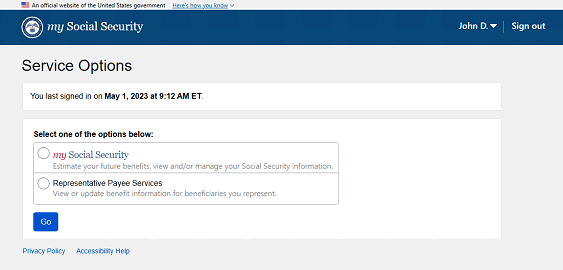
Figure 1 Service Options Page
2. Accessing Upload Documents via Representative Payee Services
Once an IRP lands on the Representative Payee Services page, they can access Upload Documents one of two ways. First, they can select “Upload Documents” under “Quick Links” (Figure 2).
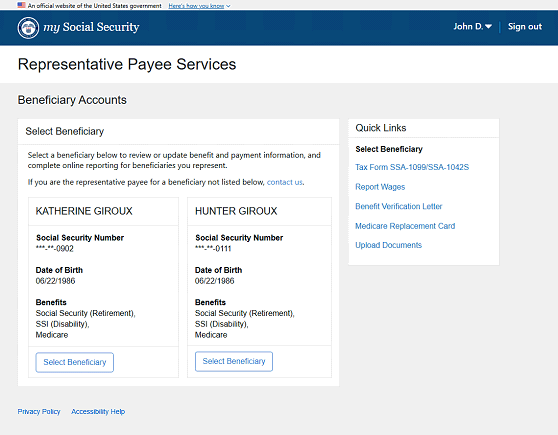
Figure 2 Representative Payee Services Page
Second, they can choose “Select Beneficiary,” (Figure 2) which will take them to the Beneficiary Overview page, where Upload Documents is one of the available service options.
Note: If the IRP represents multiple beneficiaries and entered via Quick Links, they will be prompted to choose which beneficiary to submit documents for.
3. Document Selection
Once the IRP completes their review of the Upload Documents Terms of Service and Privacy Act Statement they will land on the “Upload Your Documents” page. As shown in Figure 3, the blue banner at the top of the screen displays both the IRP’s name and the beneficiary’s name. If they select “SSA Form” the IRP will be presented with a limited number of forms available for submission based on their authentication level. The IRP can also select “Other Document” to submit evidence.
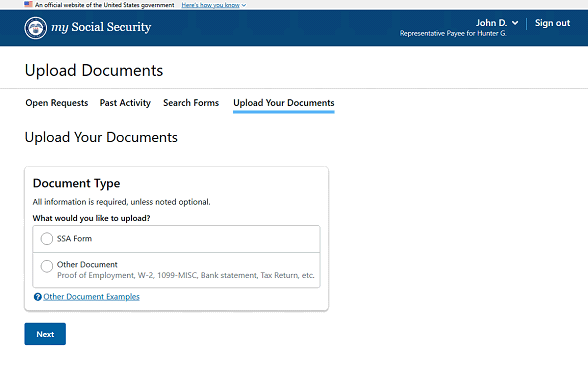
Figure 3 Upload Your Documents Page
4. Submission Status
The IRP can view submission status in the "Past Activity" tab within Upload Documents. The “Submission Initiated By” section will display “Other” for documents submitted by the IRP.
Note: Customers will be able to select the “Submission Details” blue information button to see specific submission information, including the name and title of the person that submitted the document (e.g., Name: John Smith, Title: Representative Payee).
5. eSignature
The IRP will use the existing eSignature functionality for forms requiring a signature in Upload Documents.
The IRP must be authorized to sign the submitted document on behalf of the beneficiary for electronic signature purposes, and the signature must match the authenticator.
6. Electronic Communication
The IRP initiated process will mirror the existing first-party customer-initiated process for receiving submission confirmations in Message Center. Submission confirmations will appear in the IRP portal’s Message Center.
Note: The IRP Message Center for Representative Payee business is separate from the IRP’s personal my Social Security Message Center. The IRP will receive a confirmation in their message center of the submission on behalf of the beneficiary. The beneficiary will not receive a separate notification.
E. Technician Processing
Once the IRP has completed, uploaded and submitted their desired document it will be routed to the field office associated with the representative payee’s mailing address zip code. All documents submitted through Upload Documents will come in through the field office WorkTrack. However, they will need to be assigned to the appropriate technician for processing.
NOTE: If an IRP submits a signature-required SSA form as evidence via Upload Documents, the technician must print the form and return it to the submitter. Include a notice stating that the form must be submitted using the correct submission method (and/or electronic signature), or that it cannot be accepted via Upload Documents and should be mailed or delivered to the local FO. (See GN 00301.015 and GN 00301.030) If an IRP submits a form not requiring a signature or other evidentiary document, accept the submission(s).
Technicians should continue to follow existing policies and procedures for determining the proper applicant / signature / signor for each submission.
F. References